 MC Seed Map
What Is Chunkbase Seed Map? Try a Cleaner Minecraft Seed Map
A simple explanation of Chunkbase Seed Map and a practical, beginner-friendly way to explore Java and Bedrock seeds with MC Seed Map.
Chunkbase is a long-running third-party Minecraft website known for tools that help players view a seed as a map. Its Seed Map takes a Minecraft seed, edition, and version, then shows the world as an interactive view with biomes and structure locations. It is not an official Mojang or Microsoft product, but many players recognize the name when searching for a Minecraft seed map.
That is the main idea. If you are simply looking for a comfortable way to explore a seed, MC Seed Map offers a cleaner and more spacious experience for both Java and Bedrock. You can enter a seed, look around the world, open useful markers, and plan where to travel without installing anything.
Explore your Minecraft seed
Paste your seed, select Java or Bedrock, and see the world before you begin a long journey.
Open MC Seed Map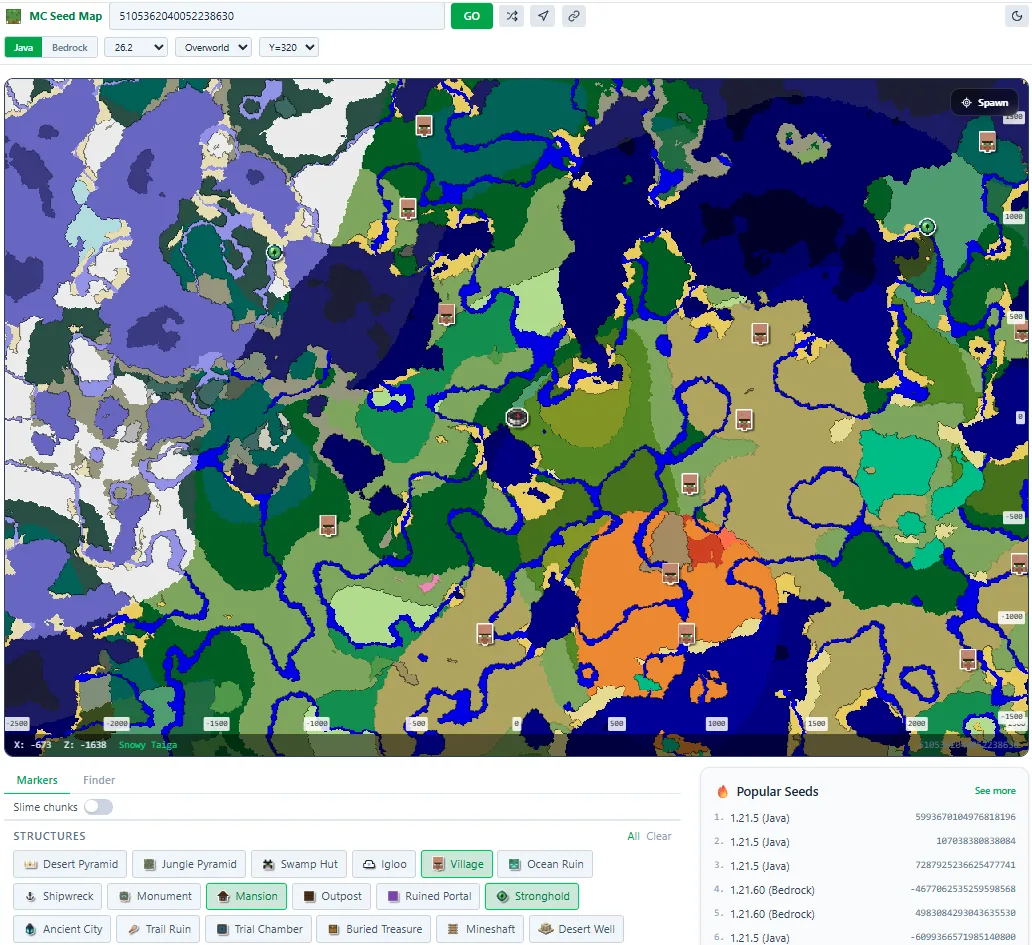
See the Important Parts of a Seed in One Place
A seed number does not tell you what the world feels like. The map turns that number into something visual. You can see large oceans, snowy regions, forests, deserts, mountain areas, unusual biome borders, and the general shape of the land without spending an evening walking in the wrong direction.
MC Seed Map puts the most common choices near the top of the screen. The seed field, Java and Bedrock buttons, version, dimension, and map height are easy to reach. The map remains the largest part of the page, so you can focus on the world instead of searching through several menus.
This is useful whether you already own a world or are choosing a new one. Existing players can plan a route from their base. New players can compare several seeds and decide which world offers the landscape and nearby places they actually want.
Choose Java or Bedrock Before Exploring
The first choice should always be the edition you play. Java and Bedrock can look similar in modern Minecraft, but important locations may not appear in exactly the same place. A village shown for Java should not automatically be expected at the same coordinates in Bedrock.
MC Seed Map keeps the Java and Bedrock choice visible instead of hiding it deep inside settings. The version selector is next to it, making it easier to match a seed from your own world, a YouTube video, a server, or a community post.
The site includes Java selectors from 1.7 through 26.2 and Bedrock selectors from 1.16 through 26.20. For the newest releases, treat the map as a planning guide and confirm any location that is essential to your world. You can also begin directly from the Java Seed Map or Bedrock Seed Map.
Begin at Spawn and Explore Outward
Spawn is the best place to begin reading a seed. Click the Spawn marker and look at the surrounding area. Is there wood nearby? Is the terrain easy to cross? Are there useful biomes within a reasonable distance? A beautiful landmark far away may be less valuable than a comfortable start with several good travel options.
Zoom out slowly instead of jumping straight to the widest view. The first few hundred blocks tell you about early survival. The next few thousand blocks reveal whether the seed has enough variety for a longer world. This simple approach keeps the map useful rather than turning it into a wall of colors and icons.
Players looking for a peaceful start may prefer plains, forests, and rivers near spawn. Builders may look for mountain bowls, islands, cliffs, cherry groves, or broad flat land. Explorers may prefer a seed where several climate regions meet and every journey leads somewhere visually different.
Find a Better Place to Build
One of the most practical uses of a seed map is choosing a base location. A good base is not only attractive. It should also connect to the resources, structures, and travel routes you expect to use. The map helps you compare those needs before moving every chest and animal across the world.
For a solo survival world, you might want a scenic area with nearby wood, food, and access to several biomes. For a multiplayer server, you may need a central region with enough space for separate bases. For a creative project, the shape of the terrain may matter more than nearby loot.
Use the map as a shortlist. Pick two or three promising locations, note their coordinates, and visit them in game. The map can reveal the broad opportunity, while Minecraft shows the exact cliffs, caves, trees, and views that make a place feel right.
Turn On Only the Markers You Need
Structure markers are more useful when the map is not crowded. If you are looking for a village, turn on villages and perhaps one or two related destinations. If you are planning a Nether trip, focus on portals, fortresses, and bastions. If you are preparing for the End, look at strongholds before worrying about distant End cities.
Clicking a marker opens its location so you can understand where it sits in relation to spawn and nearby biomes. This makes it easier to answer practical questions: Is the village close enough for the first day? Is the mansion worth the walk? Can several friends build in different places without becoming isolated?
A marker is a planning clue, not a promise that every surrounding block will look exactly as imagined. Terrain, underground placement, world settings, and very new game versions can affect what you find. Check especially important destinations in game before making them the center of a large plan.
Plan Overworld, Nether, and End Journeys
The Overworld is where most players spend their time, but a complete survival route eventually crosses dimensions. Use the dimension selector to move between the Overworld, Nether, and End without leaving the page.
In the Nether, the map can help you choose a direction for fortress or bastion exploration. It can also help with travel planning because Nether distance is shorter than the equivalent Overworld journey. In the End, the map narrows down useful exploration directions after the dragon fight.
You do not need to plan every future adventure on the first day. Save or share the seed URL and return when the world reaches a new stage. A seed map is often most valuable over time: first for spawn, later for a base, then for farms, rare structures, and long-distance travel.
Share the Same View With Friends
A good multiplayer plan is easier when everyone sees the same seed, edition, and version. MC Seed Map creates a readable URL for the selected seed. Use the share control to send the map to friends instead of sending a seed number followed by a long list of coordinates.
Shared links are useful for voting on a server spawn, comparing base locations, planning a community shopping district, or discussing where a Nether hub should begin. Friends can open the map in a browser and continue exploring from the same world.
Common Mistakes That Make a Map Look Wrong
If a seed map does not match your world, first check the simple things. Make sure the full seed was copied, including a minus sign when present. Confirm Java or Bedrock, then confirm the version. These small details cause many more problems than the map itself.
Custom worlds can also be different. Mods, datapacks, server plugins, experimental settings, and worlds upgraded through several releases may change what appears. In those cases, use the map for general direction and rely on the game for final confirmation.
For a wider introduction, read How to Use a Minecraft Seed Map Without Wasting Time. It offers another practical workflow for evaluating spawn, travel distance, and structures.
A Simple Seed-Checking Routine
- Paste the complete seed number.
- Select the correct Java or Bedrock edition.
- Choose the version used by the world.
- Start at Spawn and inspect the nearby biomes.
- Turn on only the structures needed for your current goal.
- Compare two or three possible base or travel locations.
- Share the map with friends when planning together.
- Visit important coordinates in Minecraft before committing to a major project.
This routine takes only a few minutes, but it can prevent hours of unnecessary travel. More importantly, it helps you choose a world because it suits your plans, not only because one screenshot looked impressive.
Final Thoughts
Chunkbase Seed Map is a familiar name for a long-running Minecraft map tool. The basic idea is simple: enter a seed and use a map to understand the world before exploring every block yourself.
MC Seed Map provides that experience with a cleaner layout focused on quick Java and Bedrock exploration. Paste your seed, begin at spawn, look for the places that match your goals, and use the map to decide what deserves an in-game visit. It should make planning easier while leaving the best part, discovering the world itself, inside Minecraft.